Case study · Shoniz
Security Operations System
A web panel for guard and gate operations at industrial sites
- Role
- UI/UX Designer, working directly with the product owner
- Context
- Shoniz
- Tools
- SecurityEnterpriseWorkflow
01
Context
The problem
The Security Operations System is a Persian, right-to-left web panel for the security staff of a site. It covers who and what enters and leaves the site: goods, personnel items and visitors, along with loading and unloading, patrols and guard management.
What was broken
Gate and security work involves many kinds of movements, each with its own permits, people and items. Staff need to see the status of each case quickly and act on it at the gate, without losing track of what is still pending.
02
Approach
How I got there
01
Field research and talks with the stakeholders to understand the real work, desk research on similar products and best practices, and business meetings to agree on the problem and find the solution. I did the full product-design scope: research, solution finding and design.
02
Worked directly with the product owner to define the sections, the users and their daily tasks.
03
Mapped the user flows for each area: entry and exit cards, personnel items, loading and unloading, patrols and visitors.
04
Drew wireframes, then the interface, and reviewed them with stakeholders in several iterations.
03
Thinking
Key decisions
I decided to
Group the daily gate work into clear sections in the side menu
Because
Entry permits, exit permits, personnel items, loading and unloading, patrols and visitors each have their own section, so a guard goes straight to the task instead of searching.
I decided to
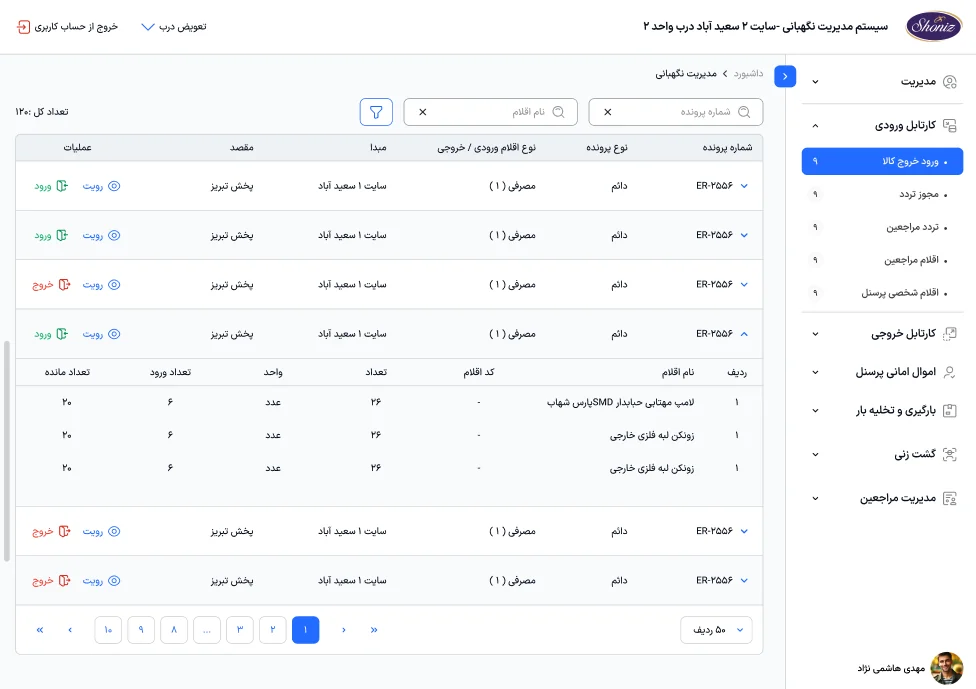
Make the case list the main screen, with row expansion and quick actions
Because
Each row shows the case number, type, origin, destination and item type, and opens to its items in place. Entry, exit and view are one click away on every row.
I decided to
Design the empty state to lead to the next action
Because
A screen with no guards defined says so and offers the add button twice, so a new site can be set up without help.
04
Impact
Results
- One system for the gate's daily work instead of separate steps.
- A consistent look and flow that matches the other internal enterprise systems at Shoniz.
Why so few screens? Most of this work is under NDA, so I can only share a small part of it. I am happy to walk through the rest in a conversation.
The craft